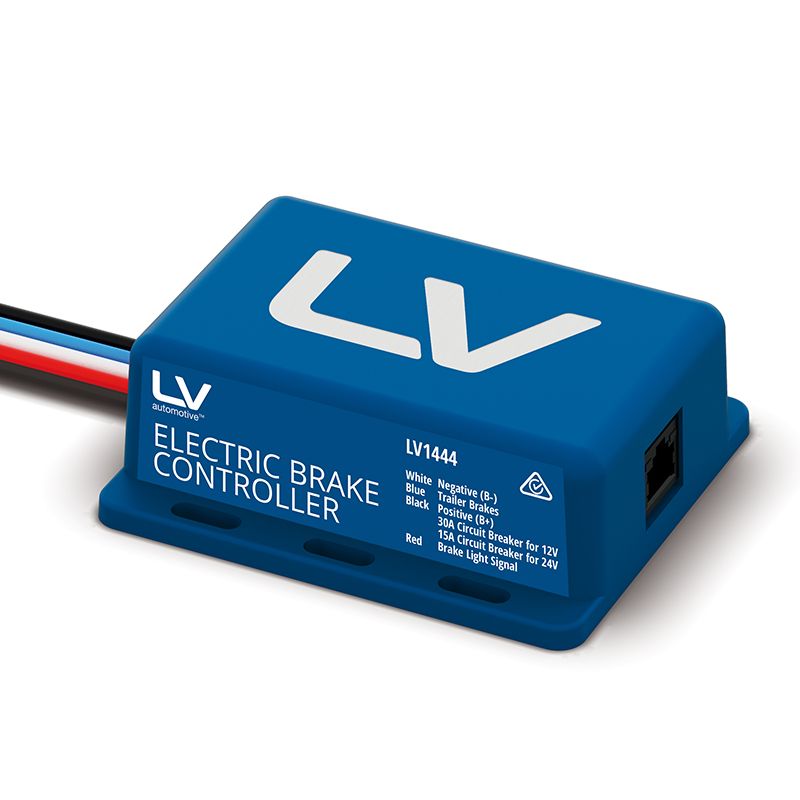
Remote Head Electric Brake Controller 12/24V COMPACT REMOTE HEAD 1-3 Axles
$225.00
Availability: 34 in stock

REMOTE MOUNT ELECTRIC BRAKE CONTROLLER
Part Number:LV1444
The nitty
gritty.
For 1–3 Axle Trailers | 12V & 24V Compatible | 5-Year Warranty
A compact, remote-mount electric brake controller designed for simple installation and smooth trailer braking. The in-cab adjustment knob provides easy control, while the main control unit hides neatly out of sight for a clean factory-style look. Suitable for caravans, campers, trailers and horse floats running 1–3 electric brake axles.
Perfect for modern vehicles with limited interior space.
FEATURES
- Remote head design – only the control knob is visible in the cabin
- Main unit mounts out of sight for a clean OEM look
- Suitable for 1–3 axle electric brake trailers
- Works with 12V or 24V systems
- Simple rotary adjustment for brake force
- Push-button override function
- LED status light for trailer connection & braking feedback
- 5-year manufacturer warranty
- Compatible with early and late-model vehicles (with diode included for late models)
SPECIFICATIONS
- Minimum Input Voltage: 9V
- Nominal Input Voltage: 12V / 24V
- Maximum Input Voltage: 30V
- Suitable for 12V Trailer Brake Systems: Yes
- No-Load Current Draw: 12mA
- Maximum Load: 1–3 Axles
- Dimensions: 30 × 57 × 90 mm
- Weight: 200g
- Warranty: 5 Years
WIRING INFORMATION
Black Wire: Battery Positive (B+)
White Wire: Battery Negative (B– / Earth)
Blue Wire: Trailer Brake Output
Red Wire: Brake Light Signal (Positive feed only)
Early-Model Vehicles:
Connect the red wire to the brake switch cold side or a DC source that becomes positive when the brake lights activate.
Late-Model Vehicles:
Connect the red wire to trailer socket pin 6 (brake light circuit) and install the included diode to prevent feedback into the vehicle system.
Important:
- Do not reverse positive and negative wiring
- Unit must be properly grounded
- Do not connect B+ to fuse panels or accessory wiring
- All wiring must be secure and insulated
- Incorrect wiring can cause brake failure or damage
INSTALLATION
- Disconnect the vehicle’s negative battery terminal
- Choose suitable mounting locations for the remote head and main unit
- Drill an 8.5 mm hole for the remote head
- Install the control knob & secure with retaining nut
- Turn adjustment knob fully counter-clockwise before setup
- Mount main unit following the wiring diagram
- Plug remote head into the main unit via the RJ45 connector
- Reconnect battery and test system
- Set brake force as per vehicle and trailer requirements
OPERATION
Setting Brake Force:
Rotate the knob clockwise to increase braking, counter-clockwise to decrease.
Override Function:
Press and release the knob to manually apply the trailer brakes. Force is based on knob position.
LED Indications:
- Solid Green: Trailer connected, brakes active, all systems OK
- Flashing Green: Brake pedal pressed or override active
- LED Off: No power or trailer disconnected
WHAT’S INCLUDED
- Main brake controller unit
- Remote dash-mount knob
- RJ45 connection cable
- Wiring harness
- Diode (for late-model vehicles)
- Installation instructions
SUITS
- Caravans
- Camper trailers
- Box trailers
- Horse floats
- Trades trailers
- Boat trailers
- Any 1–3 axle electric brake setup (12V trailer brakes)
NOTES
- Requires a proper electrical load (trailer brakes) on the blue wire for accurate testing
- Cannot be tested with a voltmeter or LED test light due to pulsed output signal
- Must be installed according to the included wiring diagram
IMPORTANT – Electrical Items Return Policy
Due to the nature of electrical and electronic components, we cannot accept returns for change of mind, incorrect ordering, or once the packaging has been opened. This includes items that have been installed, tested, powered on, trial-fitted, or tampered with in any way.
Electrical items can only be returned if:
- The item is not as described, or
- There is a verified manufacturing fault.
For safety and quality reasons, electrical components cannot be purchased, opened, tested, and then returned. This policy is industry standard and complies with Australian Consumer Law.
Postage Information:
We recommend monitoring your tracking closely, as Australia Post does not always leave a card if no one is in attendance. If no one is available to accept a Signature on Delivery item, it will be taken to your local Post Office for collection.
To stay up to date with your delivery, we suggest downloading the free AusPost app — it provides real-time tracking updates, notifications, and reassurance that all info comes directly from Australia Post.
*All pictures shown are for illustration purposes only. The actual colours may vary from those shown depending on the device you are using to view the product or the angle of the item is photographed. Actual products may vary due to product enhancements or updates. The listing should be referred to for the description of the product, any questions should be asked prior to purchase.
| Manufacturer Part Number | |
|---|---|
| Brand | |
| Warranty |
Brand
Hayman Reese